Showing posts with label information. Show all posts

Tuesday, July 17, 2012

Tech Geek Tricks is now Achute Tech

Hi , every one . I take this opportunity to welcome you all to a new domain name for techgeektricks
As you may have noticed that Techgeektricks has become Achute Tech . |

I have just joined college and today was my first day in college . I will not be able to give time to this Blog / Site for few days .. But Sure I will try my best to keep you guys updated on The latest Happenings in the Tech World And of course in my life .

I would like to begin a new journey with this blog and with you all  and so that we may all learn with me . As I travel through this huge tech world and learn.

Sunday, July 8, 2012

Facebook Security And Privacy Tips

Facebook the worlds most popular social network.
Most people use it .. but they still dont know many features which is hidden inside Facebook and how to be secure in this digital age : Here we will provide few quick tips to protect your Facebook Account to make it more secure

SECURITY TIPS
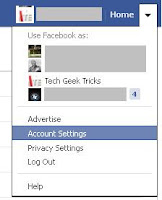

Here is a list of Few Security Tips which we follow and we recommend it to you as well. To follow these tips you need to click on the drop down arrow icon near your Home button and click on Account Settings - Check the image for more info
  •  First and foremost Thing you need to update your password often :D well I guess every one knows that but most don't follow it 
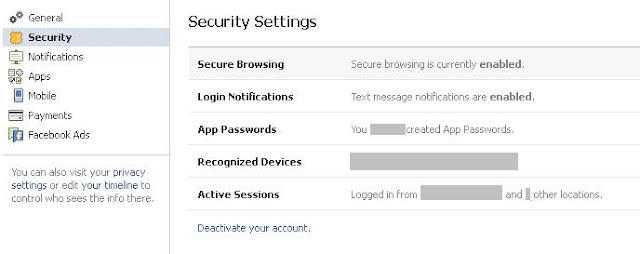
Now Go to the security tab located on the left hand side as Shown in the figure
There you will see a few settings which can be configured like
 Secure Browsing , Login Notification and all as shown in the image below


  •  [RECOMMENDED]  Now , If your secure browsing is turned off  than there is a huge risk of your Facebook account getting hacked , thorough Facesniff , and other sniffer applications, may it be on phone or in PC Therefore its is MUST that you activate this Secure browsing . It will make use of Secure protocol instead of normal protocol. In simple words it will use https:// instead of http://    Which is more safe
  • [RECOMMENDED] Next thing you need to do is Activate Login Notification. What it does is it sends you SMS or email or both when some one logs into your Facebook account including You.
    This is a great way to know if anyone else accessed your Facebook account
If You use Facebook via SMS , or if you reply or add friends to your Facebook account using SMS Then This Security Tip is very important to you. That is to activate mobile pin settings. To do so Click on the mobile tab as shown in the figure before or you can click on this link www.facebook.com/settings?tab=mobile


Here is whats written in Facebook about it

If you enable this feature, you need to prefix every status changing and friend adding text you send to Facebook with your selected PIN. This is to make sure that others will not have access to your account by spoofing your phone number or borrowing your phone.

 PRIVACY TIPS 

 Have You always wanted to hide your status updates your wall photos and other thing from few people or just make it visible to some people and hide it from the rest Or to control what people tag you and Control it  then here is how to do it.


Who Can See You ?

If you want to Hide your status update and all from many people then follow the following steps else ignore the list creating step

List Creating Step :

To put it in simple words you don't require to specify the individual by his name while setting your privacy , You can just use the list name and all the members of the list will be selected at once which saves time.
  • Go to www.facebook.com/bookmarks/lists 
  • Now click on +Create List
  • Specify the list name in my case it is Protect and add the members in the list
  • Click create and you are done
Setting the privacy option:
  • Now go to privacy settings from the drop down beside the home button or go to this link www.facebook.com/settings/?tab=privacy
  • Under Control Your default privacy click on custom
  • You Should see a pop up as shown >>
  • Now you need to type the name of the list as mentioned above or name the person from whom you want to hide your wall activities
    In my case it is Protect
  • Now click on Save Changes and you are done
 Now your wall activity will only be visible to your friends except the people you choose to hide from.

You can also configure these settings for individual post by clicking on the butoon just beside POST as shown in the image

And If you always wanted to secure your profile then here is how to do it - From Facebook itself
www.facebook.com/about/control/


Controlling the Tags

Now the Next setting is very important . As you see now days that unknown people or people from your friend list tag you in pics which you don't like or don't want. Some people tag you in very explicit pics and all your friends can see that you are tagged in those things . Here is how to control what other people tag you , And its very much recommended for girls to follow this

To control what happens when friends tag you or your content, or post on your timeline go to Privacy settings And click on edit settings  under the Timeline and Tagging label A pop up should appear as shown >>

Now click on Review posts friends tag you in before they appear on your timeline and enable it.

So when any one tags you in a picture or a wall post you need to approve it before it appears on your timeline . Isn't that great.

Of course I haven't mentioned all the privacy settings you can do, If I did that then this post would be very boring and well you can explore on your own self thw privacy settings facebook offers and customize them according to your privacy needs by going here www.facebook.com/settings/?tab=privacy

What I have mentioned in this Blog Post are the tips and settings I feel which is a must , You are free to check out the rest.

Stay Tuned as my next post will focus on the Hidden Facebook Tricks .. Till then take care. 

Tuesday, April 24, 2012

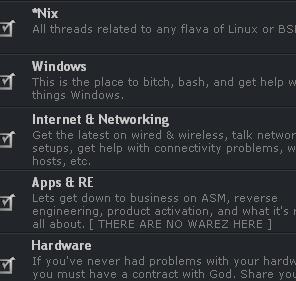
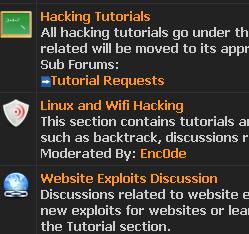
Top 10 Hacking , Cracking Forums

Do you want to learn hacking , cracking and don't know the right place to start then don't worry.
As we all know Forums are a great place to learn about stuffs .
Interested In Top 10 Computer Technology forums - Read this post
Therefore, without beating much around the bush let me come directly to the topic - TOP 10 Hacking / Cracking Forums - Ranked according to no of post,users and topics.

1- Hackforums[dot]net

With over 1,69,60,562 posts , 17,25,076 threads 2,74,438 members registered and with 2,404  Most users online This is definitely one of the Forums which You gotta signup if you wanna  learn Hacking ;) 

Here's more stats


Posts per day: 7,787.99
Threads per day: 792.09
Members per day: 126.2
Posts per member: 61.71
Replies per thread: 8.83  

2- Crackingforum[dot]com


With over   38,93,861 posts   2,00,155 Threads 2,36,529 members registered and 15,828 Most users online.

This Forum ranks 2nd position in top 10 hacking / Cracking forums  


3- Crackhackforum[dot]com

 
This forum has more than 318,583 posts in 148,954 threads. They currently have 74,966 members registered And the most users online at one time was 2,433 makes this forum the 3rd forum  in our list of top 10 hacking / cracking forums .

Here are More Stats
Posts per day: 406.13
Threads per day: 189.88
Members per day: 95.69
Posts per member: 4.24
Replies per thread: 1.14

 4- hackerthreads[dot]org


 This forum has more than1,12,748 posts in 13,865 threads. They currently have 20,664 members registered And the most users online at one time was 149.

This stats makes this forum the 4th forum in our list of top 10 hacking / cracking forums.


5- hackcommunity[dot]com

 
With over  63,436 posts in 11,281threads , 22,210 members registered and with 3,100 Most users online This is definitely one of the Forums which you wouldn’t  mind signing up for :)

Here are more stats 

Posts per day: 124.05
Threads per day: 22.06
Members per day: 43.37
Posts per member: 2.86
Replies per thread: 4.62


6- l33thackers[dot]com

This forum has more than 51,090 posts  in 28,997 threads. They currently have 10,063 members registered And the most users online at one time was 473 makes this forum the 6th forum in our list of top 10 hacking / cracking forums.

Here are more stats
Posts per day: 81.37
Threads per day: 46.13
Members per day: 16.03
Posts per member: 5.08
Replies per thread: 0.76

7- Andhrahackers[dot]com


This forum has more than 19,538 posts in 5,318 threads. They currently have 24,610 members registered  And the most users online at one time was 3687 makes this forum the 7th forum in our list of top 10 hacking / cracking forums.


  8- hacker[dot]org

  
This forum has more than 18,480 posts in 2,016 threads. They currently have 26,967 members registered And the most users online at one time was 793 makes this forum the 8th forum in our list of top 10 hacking / cracking forums.


9- evilzone[dot]org


 This forum has more than 16,626 posts in 2,552 threads. They currently have 5,453 members registered And the most users online at one time was 907 makes this forum the 9th forum in our list of top 10 hacking / cracking forums.

10- worldofhacker[dot]com

 
 This forum has more than 11,434 posts in 2,739 threads. They currently have   17,383 members  registered And the most users online at one time was 439 makes this forum the 10th forum in our list of top 10 hacking / cracking forums.
More Stats on this Forum
Posts per day: 20.62
Threads per day: 4.94
Members per day: 31.36
Posts per member: 0.66
Replies per thread: 3.17


BONUS

My friends recently created a forum dedicated to hacking @cyberwizards.org its sure worth a visit do check it out :)

Thursday, April 19, 2012

Root Galaxy Mini

What is Rooting ?


According to Wikipedia:
Rooting is a process allowing users of mobile phones, tablet PCs, and other devices running the Android operating system to attain privileged control (known as "root access") within Android's subsystem. Rooting is often performed with the goal of overcoming limitations that carriers and hardware manufacturers put on some devices, resulting in the ability to alter or replace system applications and settings, run specialized apps that require administrator-level permissions, or perform other operations that are otherwise inaccessible to a normal Android user.
So without beating much around the bush lets get started on How to Root Galaxy Mini Running Android 2.2.1 .

Requirements To Root Galaxy Mini:

  1. Latest Samsung Kies ( For Drivers ) - DOWNLOAD
  2. Super One Click ( Software For Rooting ) - DOWNLOAD

Important Information Before Rooting Galaxy Mini

  •  Rooting Voids Your Phone Warranty 
  •  You may Brick Your Phone 
Please Turn off any Antivirus Software installed in your computer .
Unmount Your SD Card Before Rooting
To do so go to Settings in your phone > SD Card and Phone Storage > Unmount SD Card

Now you are ready to root your Galaxy Mini :)  

Rooting Your Galaxy Mini 

  1. Install Samsung Kies  - For Drivers
  2. Enable USB Debugging in your phone (Go to Settings > Manage Applications > Development > USB debugging )
  3.  Connect the phone via the USB cable 
  4. Open SuperOneClick.exe
  5. Click On Root 
  6. Wait for some time 
  7. After Finishing Reboot Your Phone

Wednesday, January 19, 2011

What Do People Do on the Internet?

It’s everywhere, it has invaded every aspect of our lives, and it has brought about a great many changes to the way we live. Simply put, it’s impossible to even consider a world without the Internet today. It may not all be good, but the fact is that it’s here to stay. The web helps us keep in touch with people in other ends of the world; it provides us with new experiences and encounters; and it is entertaining to say the least. So what do most of the billions of people who use the Internet do online?
According to USA Today, the average American spends around 25 percent of their time online, and the top activities on the web in order of decreasing importance are social networking, online gaming, and emailing. Also, the time spent on email and instant messengers has come down (email and instant chat have been rolled into Facebook and other social networks which seem to have become all-in-one platforms for communication) while that spent on watching videos and movies online has gone up (thanks to the advent of torrent file shares and faster Internet speeds).  

Some people do a major part of or all their work online, and for them, the biggest hurdle to achieving their target or getting things done is to ignore the lure of the web. It’s tempting to check mail every few minutes, see if someone has left a comment on your Facebook status or responded to your tweet, play a quick game online in the short break you have, or shoot off a reply to the chat message your friend left seeing you online. The problem with doing all these and much more on the web when you’re at work is that the few minutes you allow yourself often turn into hours, and before you realize it, the whole day has gone by and you haven’t
been productive at all.

Considering the fact that people work and spend time for their personal and social lives, spending 25 percent online on activities that are mostly entertainment-related says something about the irresistible nature of the web. It has us in some kind of a hold, one that we’re unable to extricate ourselves from without suffering withdrawal symptoms and giving in the craving that gnaws at us. Technology today is pervasive, and even if we stay away from our computers, our smartphones lure us to the web with their sleek looks and do-it-all capabilities.

Also, it’s pretty much impossible to isolate yourself from the Internet because if you do, it’s like you’ve cut yourself off from the rest of the world. So the key to making the most of this technology is to use it in moderation, especially for activities that are not really productive and which end up wasting your time and energy without giving you anything in return except a guilty conscience. If you’re able to balance your real life with your virtual one without letting the latter take over the former, that’s when you get the most out of the Internet and its associated technology.
______________________

This guest post is contributed by Cathy Thomas, she writes on the topic of Online Computer Technician Schools . She welcomes your comments at her email id: cathy83.thomas<@>gmail<.>com.

Wednesday, December 8, 2010

Top 10 Technology,Computer Forum

As the title says , Today we will look at the webs top 10 Technology, Computer, Internet related forums. A forum is a place where we can openly discuss things, therefore it provides us a helping hand to our problems, We can read the latest news or latest reviews or it is a place where we can just discuss. So, here are the top 10 technology forums, Where you can find the maximum no of users, topics and post.

1. Anandtech Forum
This forum, with over 284,46 members, 30,897,923 Post and  2,122,658 Threads, is the largest Tech Forum, It  is definitely one of those forums , which you wont regret signing up. So head over to Anandtech forum and sign up now.

2. Whirlpool Forum
 It is an Australian Internet and technology discussion forum, But still it is opened to users all around the globe, It is one of the best place to look for help. Tough this site is mainly for Broadband and such stuffs, you always get help here in other matters to. With  1,426,764 topics , 27,106,732 post and 397,200 members, This site is a Must for anyone interested in Tech stuffs.


 3. Tech Support Guy
In the Third position we have Tech Support Guy , with over 900,058 topics , 7,544,119 post and 574,689 members, This forum is an ideal place for anyone, searching for a great tech forum. 


 4. Tech Support Forum
With over 507,194 Threads, 2,981,882 Post and 723,500 members the Fourth position goes to Tech Support Forum.


5.Neowin Forums
With over  628,471 Topics, 9,789,416 Post and 256,479 Members Neowin Forums takes the 5th place, In this top ten list.   


In the sixth position we have BleepingComputer.com , with over 268,103 threads, 2,007,686 posts and  424,369 members. The Discussion ranging from Operating Systems ,Hardware , Software , Internet and Networking to Security and lots more.
  
 7. Geeks to Go Forums

In the Seventh Position We have Geeks to Go Forums,They have over 242,544 Topics, 1,911,079 Post and 333,681 Members. If you are new Geeks to Go then here is an introduction (learn how it works)


8. TechArena Community

In the 8th position we have TechArena Community With over 150,347 Topics, 762,518 Post and  215,687 Members , TechArenaCommunity truly deserves the 8th Position.  Here is a screenshot of it.

9. TechSpot

The 2nd last position of the top ten goes to TechSpot, With over  145,871 Topics, 940,477 post and 178,326 Members , it is surely one of the best tech Forums out there.
  
10. Cyber Tech Help Support Forums


Last but not the least we have the Cyber Tech Help Support Forums at the 10th position, of our webs top 10 technology and computer related forums. 
 

-: Bonus :-
Thinkdigit , Tough its not in the top ten list, its one of ma personal favorites, I hope you too will like this forum as i do. With 1,123,800 post with only 29,821 Members , I couldn't ignore it ;)

________

I hope you guys have enjoyed reading this post as much as i enjoyed writing it, Please do comment on what you feel about the top ten Forums.

Monday, September 22, 2008

Use CCleaner to clean Your pc

I love to erase my traces of working in the internet and it is a little pain in the back to first clean the history then cache, cookies,registry,etc...
So Why not use a freeware application CC Cleaner which cleans your computer.Frees up more space Here is what the cccleaner websites says

CCleaner is a freeware system optimization, privacy and cleaning tool. It removes unused files from your system - allowing Windows to run faster and freeing up valuable hard disk space. It also cleans traces of your online activities such as your Internet history. Additionally it contains a fully featured registry cleaner. But the best part is that it's fast (normally taking less than a second to run) and contains NO Spyware or Adware! :)

And here are some of its features

Cleans the following Windows components:

* Internet Explorer
- Temporary File Cache
- URL History
- Cookies
- Hidden Index.dat files
- Last download file location
* Firefox
- Temporary File Cache
- URL History
- Cookies
- Download manager
* Recycle Bin
* Clipboard
* Windows Temporary files
* Windows Log files
* Recent Documents (on the Start Menu)
* Run history (on the Start Menu)
* Windows XP Search Assistant history
* Windows XP old Prefetch data
* Windows memory dumps after crashes
* Chkdsk file fragments

Advanced Options allow cleaning of:

* Menu Order cache
* Tray Notifications Cache
* Window Size and Location Cache
* User Assist history
* IIS Log Files
* Custom Folders

Application Cleaning:
As well as cleaning up old files and settings left by standard Windows components, CCleaner also cleans temporary files and recent file lists for many applications. Including:

* Firefox, Opera, Safari, Media Player, eMule, Kazaa, Google Toolbar, Netscape, Microsoft Office, Nero, Adobe Acrobat Reader, WinRAR, WinAce, WinZip and more...

Registry Cleaning:
CCleaner uses an advanced Registry Cleaner to check for problems and inconsistencies. It can check the following:

* File Extensions
* ActiveX Controls
* ClassIDs
* ProgIDs
* Uninstallers
* Shared DLLs
* Fonts
* Help File references
* Application Paths
* Icons
* Invalid Shortcuts and more...

Safety:
CCleaner was designed from the ground to be safe and secure to use. It has multiple levels of checks in place to ensure that it cannot delete any useful information or documents you may still need. We also certify that it contains no Spyware or Adware.
High Security:
For the super cautious users we also offer secure file erasing. By overwriting the files before deleting them, making it impossible to recover the data.
Multiple Languages:
Thanks to the translators, CCleaner is available in 35 different languages:

English, Albanian, Arabic, Bosnian, Bulgarian, Catalan, Chinese (Simplified), Chinese (Traditional), Czech/Slovak, Danish, Dutch, Finnish, French, Galician, German, Greek, Hebrew, Hungarian, Italian, Japanese, Korean, Lithuanian, Macedonian, Norwegian, Polish, Portuguese, Portuguese (Brazilian), Romanian, Russian, Serbian Cyrillic, Serbian Latin, Slovak, Spanish, Swedish and Turkish.


so get ahead and download this cool and powerful application
CCleaner - Freeware Windows Optimization

Wednesday, October 10, 2007

What is rss

RSS (formally "RDF Site Summary", known colloquially as "Really Simple Syndication") is a family of Web feed formats used to publish frequently updated content such as blog entries, news headlines or podcasts. An RSS document, which is called a "feed", "web feed", or "channel", contains either a summary of content from an associated web site or the full text. RSS makes it possible for people to keep up with their favorite web sites in an automated manner that's easier than checking them manually.
RSS content can be read using software called an "RSS reader", "feed reader" or an "aggregator". The user subscribes to a feed by entering the feed's link into the reader or by clicking an RSS icon in a browser that initiates the subscription process. The reader checks the user's subscribed feeds regularly for new content, downloading any updates that it finds.. The initials "RSS" are used to refer to the following formats:Really Simple Syndication (RSS 2.0)RDF Site Summary (RSS 1.0 and RSS 0.90)Rich Site Summary (RSS 0.91)
RSS formats are specified using XML, a generic specification for the creation of data formats.
read more in

http://en.wikipedia.org/wiki/RSS_(file_format)